
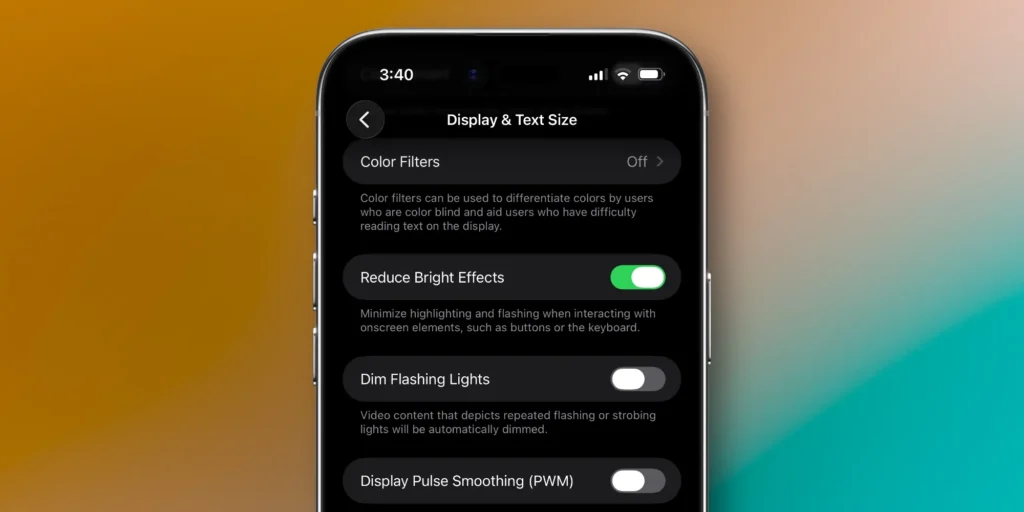
Apple has introduced another control for users who want a less aggressive version of the Liquid Glass interface. With iOS 26.4 beta 4, the company added a new setting called Reduce Bright Effects, giving users a way to limit the bright flashing animations that appear when interacting with parts of the UI.
New accessibility setting reduces flashing interface responses
Since the debut of iOS 26, Apple’s Liquid Glass design language has gone through several adjustments. Alongside those refinements, the company has also started adding options for people who prefer a more restrained visual experience.
One of the earlier changes arrived with iOS 26.1, when Apple added a toggle in Display & Brightness that let users switch from the default Clear style to a more muted Tinted appearance. That option made the interface feel closer to the older iPhone look.
Now, iOS 26.4 beta 4 expands that approach with a separate control focused on motion and brightness effects. The new Reduce Bright Effects setting cuts down the bright flashing response tied to certain interface elements during interaction.
The toggle can be found in Settings, under Accessibility, then Display & Text Size. Once enabled, it reduces one of the more visually intense parts of the Liquid Glass experience.
Used together with the previously added Tinted mode, the new option pushes the interface even closer to the design language seen before iOS 26. Apple is keeping the new visual identity in place, but it is giving users more room to soften how that design feels in day-to-day use.
Finally, we have the best of both worlds! You can now disable the Liquid Glass highlights on iOS 26.4 Beta. Definitely turning them off. https://t.co/Aj56BE1uck pic.twitter.com/ozQ6OyZaaY
— Dylan (@DylanMcD8) March 9, 2026

